 DAKERA
The Confusion
When developers first build AI agents that need to remember things, the default instinct is: "I need a vector database." They spin up Pinecone, Weaviate, Qdrant, or pgvector, embed their data, and call it memory. For simple RAG use cases — querying a static document corpus — this works fine.
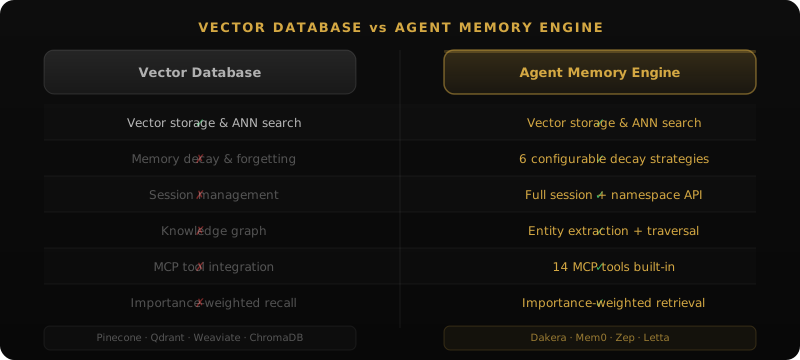
But the moment you need an agent that truly remembers — that knows what happened yesterday vs. last month, that forgets irrelevant details, that understands how entities relate to each other, that distinguishes between a casual mention and a critical fact — you discover that a vector database is a storage primitive, not a memory system.
What Vector Databases Actually Do
A vector database does one thing well: given a query vector, find the K nearest vectors in a high-dimensional space. The underlying algorithms (HNSW, IVF, PQ) are well-understood and highly optimized. Products like Pinecone, Weaviate, and Milvus add nice operational wrappers: managed infrastructure, filtering, sharding.
Here's what a vector database gives you:
- Store vectors with metadata
- Approximate nearest neighbor search
- Metadata filtering
- Sometimes hybrid search (vector + keyword)
Here's what it does NOT give you:
- Temporal awareness (when something happened, what's recent vs. stale)
- Importance scoring (critical fact vs. casual mention)
- Memory decay (old irrelevant memories fading naturally)
- Knowledge graphs (entity relationships and traversal)
- Session boundaries (separating conversations)
- Cross-encoder reranking (semantic precision beyond embedding similarity)
- On-device embeddings (privacy-preserving encoding)
What Agent Memory Actually Requires
1. Temporal Understanding
Human memory is deeply temporal. "What did the user say about their preferences?" has a very different answer depending on whether you retrieve something from yesterday or from six months ago. Vector similarity alone has no concept of time — a six-month-old embedding is indistinguishable from a fresh one.
# Vector DB approach: time is just another filter
results = pinecone_index.query(
    vector=embed("user preferences"),
    filter={"timestamp": {"$gt": "2026-04-01"}},
    top_k=5
)
# Problem: arbitrary cutoff. What if the most relevant memory
# is from March but still perfectly valid?

# Agent memory approach: temporal decay weights results
results = client.memories.recall(
    agent_id="user-prefs",
    query="user preferences",
    top_k=5,
)
# Recent memories get a boost, but highly relevant old ones still surface
2. Importance Scoring
Not all memories are equal. "The user's name is Alice" is critical and should never be forgotten. "The user mentioned it was raining" is ephemeral. Vector databases treat all vectors as equally important. Agent memory systems assign importance scores and use them during retrieval:
# Store with importance
client.memories.store(
    agent_id="user-profile",
    content="User's API key rotation schedule is every 90 days",
    importance=0.9  # Critical operational knowledge
)

client.memories.store(
    agent_id="user-profile",
    content="User mentioned they were having coffee during our last chat",
    importance=0.1  # Casual, low-value context
)
3. Memory Decay
In a vector database, data persists forever unless explicitly deleted. There's no concept of a memory "fading" over time. Agent memory implements decay strategies that model how biological memory works — frequently accessed memories strengthen, while unused ones gradually lose relevance.
Dakera supports 6 decay strategies:
- Exponential — fast decay, good for ephemeral working memory
- Logarithmic — slow initial decay, then accelerating
- Linear — constant decay rate over time
- Step — discrete importance levels that downshift on schedule
- Adaptive — decay rate adjusts based on access patterns
- None — no decay, memories persist at full strength
4. Knowledge Graphs
Vector similarity is great for "find me something similar to this query." But agents often need to answer questions like "what companies does Alice work with?" or "what depends on service X?" These are graph traversal problems, not similarity problems.
# Vector DB approach: hope the embedding captures the relationship
results = weaviate.query("what companies does Alice work with")
# Returns documents that mention Alice and companies together
# May miss indirect relationships entirely

# Agent memory approach: explicit graph traversal
relationships = client.knowledge.graph(
    agent_id="contacts-agent",
    memory_id=memory.id,
    depth=1
)
# Returns structured relationship data:
# Alice -> works_with -> Acme Corp
# Alice -> works_with -> StartupXYZ
5. Hybrid Retrieval with Reranking
Vector databases excel at semantic similarity but fail on exact terms. If you search for "error ERR-4521" and the vector database hasn't seen that specific error code in training data, semantic similarity won't help. Agent memory combines vector search (HNSW) with keyword search (BM25) and reranks with a cross-encoder for precision:
# Dakera hybrid retrieval pipeline:
# 1. HNSW vector search → top 50 candidates (semantic)
# 2. BM25 keyword search → top 50 candidates (exact terms)
# 3. Reciprocal rank fusion → merged top 20
# 4. Cross-encoder reranking → final top 5 (high precision)

results = client.memories.recall(
    agent_id="incidents",
    query="error ERR-4521 on production database",
    top_k=5,
)
The Feature Comparison
| Capability | Vector DB | Agent Memory (Dakera) |
|---|---|---|
| Vector similarity search | Yes | Yes (HNSW) |
| Keyword search | Some | Yes (BM25) |
| Hybrid retrieval | Limited | Yes (fusion + reranking) |
| Temporal awareness | No | Yes (recency weighting) |
| Memory decay | No | Yes (6 strategies) |
| Importance scoring | No | Yes |
| Knowledge graphs | No | Yes (4 edge types) |
| Session isolation | No | Yes |
| Cross-encoder reranking | No | Yes |
| On-device embeddings | No | Yes (ONNX) |
| Encryption at rest | Varies | Yes (AES-256-GCM) |
| MCP protocol support | No | Yes (14 core tools (86+ available via profiles)) |
When Vector Databases Are Enough
To be fair, vector databases are perfectly adequate for some use cases:
- Static RAG — querying a fixed document corpus (docs, knowledge base)
- Product search — finding similar items in a catalog
- One-shot similarity — finding nearest neighbors without temporal or relational context
If your "memory" is really just a document store that agents search against, a vector database is fine. The distinction matters when you need your agent to actually remember — to model a relationship with a user over time, to learn from past interactions, to know what's important and what can be forgotten.
When You Need Agent Memory
You need purpose-built agent memory when:
- Your agent has ongoing conversations with users (not one-shot Q&A)
- Context from last week matters differently than context from today
- Your agent needs to track relationships between people, projects, or concepts
- Memory should degrade naturally — not persist forever at full strength
- You need both "what is semantically similar" and "what contains this exact term"
- Privacy requires on-device embeddings and encryption at rest
Decision Framework: Which to Choose
Use this framework to determine which approach fits your current use case. Work through the questions in order — the first "yes" answer determines your recommendation.
Decision Framework
| Question | If Yes | If No |
|---|---|---|
| Is your data a fixed corpus that rarely changes? | Vector DB is sufficient (RAG, semantic search) | Continue below |
| Do you need to remember facts from previous sessions? | Agent memory required | Vector DB is sufficient |
| Do older facts sometimes become outdated or superseded? | Agent memory required (temporal decay) | Continue below |
| Do you need to track relationships between entities? | Agent memory required (knowledge graph) | Continue below |
| Do you search for exact terms, IDs, or error codes? | Agent memory required (BM25 + HNSW hybrid) | Continue below |
| Is privacy or data residency a constraint? | Agent memory required (on-device embeddings, encryption) | Vector DB may be sufficient |
| Are you cost-sensitive at scale (100K+ queries/month)? | Agent memory wins (no per-query embedding costs) | Either approach works |
Concrete Criteria by Use Case
The framework above can be distilled into concrete use case buckets:
| Use Case | Best Fit | Reason |
|---|---|---|
| RAG over documentation | Vector DB | Static corpus, one-shot queries, no temporal context |
| E-commerce product search | Vector DB | Catalog similarity, no user memory required |
| Customer support agent | Agent memory | User history, temporal context, relationship tracking |
| Personal AI assistant | Agent memory | Cross-session preferences, learning over time |
| Code assistant (multi-session) | Agent memory | Project conventions persist across sessions |
| Healthcare AI (PHI) | Agent memory (self-hosted) | Encryption, on-device embeddings, no external API calls |
| Research agent | Agent memory | Tracks what was already explored, builds on past findings |
| Incident response agent | Agent memory | Exact error codes (BM25), temporal event sequencing |
Migration Guide: From Pinecone or Qdrant to Dakera
If you've already built on a vector database and realize you need agent memory capabilities, the migration involves three phases: exporting your existing data, ingesting it into Dakera, and switching your application code to use Dakera's API instead of the vector DB client.
Phase 1: Export from Pinecone
Pinecone provides a fetch API to retrieve vectors by ID. For a full export, you'll need to iterate through your index. Pinecone's list API (available on serverless indexes) makes this straightforward:
import pinecone
import json

# Initialize Pinecone client
pc = pinecone.Pinecone(api_key=os.environ["PINECONE_API_KEY"])
index = pc.Index("your-index-name")

exported = []
for ids in index.list(namespace="your-namespace"):
    batch = index.fetch(ids=ids, namespace="your-namespace")
    for vector_id, vector_data in batch.vectors.items():
        exported.append({
            "id": vector_id,
            "values": vector_data.values,
            "metadata": vector_data.metadata,
            "text": vector_data.metadata.get("text", ""),  # if you stored text
        })

with open("pinecone-export.json", "w") as f:
    json.dump(exported, f)

print(f"Exported {len(exported)} vectors")
Phase 1 (Alternative): Export from Qdrant
Qdrant's scroll API iterates through all points in a collection, including the payload (metadata) you stored alongside each vector:
from qdrant_client import QdrantClient
from qdrant_client.models import ScrollRequest
import json

client = QdrantClient(url="http://localhost:6333")
collection_name = "your-collection"

exported = []
offset = None
while True:
    result, next_offset = client.scroll(
        collection_name=collection_name,
        limit=100,
        offset=offset,
        with_payload=True,
        with_vectors=False  # We'll let Dakera re-embed from text
    )
    for point in result:
        exported.append({
            "id": str(point.id),
            "text": point.payload.get("text", ""),
            "metadata": {k: v for k, v in point.payload.items() if k != "text"},
        })
    if next_offset is None:
        break
    offset = next_offset

with open("qdrant-export.json", "w") as f:
    json.dump(exported, f)
print(f"Exported {len(exported)} points")
Phase 2: Ingest into Dakera
Dakera will compute fresh ONNX embeddings on-device during ingestion — you do not need to carry over the original embedding vectors (and shouldn't, since your old embedding model may differ from Dakera's). The key is to preserve the original text content and metadata:
from dakera import DakeraClient
import json
from datetime import datetime, timezone

client = DakeraClient(base_url="http://localhost:3000")
TARGET_NS = "migrated-from-pinecone"

with open("pinecone-export.json") as f:
    records = json.load(f)

print(f"Ingesting {len(records)} records...")
ingested = 0
errors = 0

for record in records:
    text = record.get("text", "")
    if not text.strip():
        # Skip records with no text content — cannot re-embed
        errors += 1
        continue

    # Preserve the original timestamp if stored in metadata
    original_ts = record.get("metadata", {}).get("timestamp")

    try:
        client.memories.store(
            agent_id=TARGET_NS,
            content=text,
            tags=["migrated-from-pinecone"],
        )
        ingested += 1
    except Exception as e:
        print(f"  ERROR on {record['id']}: {e}")
        errors += 1

print(f"Ingested: {ingested}, Errors: {errors}")
Phase 3: Switch Application Code
Once migration is complete, swap your application's retrieval calls from the vector DB client to Dakera. The conceptual mapping is straightforward:
# BEFORE (Pinecone)
embedding = openai.embeddings.create(
    model="text-embedding-3-small", input=query
).data[0].embedding
results = index.query(vector=embedding, top_k=5, namespace="your-namespace",
                      filter={"user_id": user_id})
hits = [r.metadata["text"] for r in results.matches]

# AFTER (Dakera) — no embedding call, no external API, hybrid retrieval included
results = client.memories.recall(
    agent_id=f"migrated-from-pinecone-{user_id}",
    query=query,
    top_k=5,
)
hits = [r.content for r in results.memories]
The application code becomes simpler because Dakera handles the embedding computation internally. You also gain temporal weighting, BM25 keyword matching, and cross-encoder reranking for free — no additional code changes required.
Validating the Migration
Run a parallel validation period where both systems receive queries and you compare results. A useful validation query set is your most frequent production queries — check that the top-5 results from Dakera are at least as relevant as the top-5 from your old vector DB:
import random

# Sample 100 recent queries from your logs
sample_queries = get_recent_queries(limit=100)

for query in sample_queries:
    dakera_results = client.memories.recall(
        agent_id="migrated-from-pinecone", query=query, top_k=5
    )
    # Log for manual review or automated relevance scoring
    print(f"Query: {query[:60]}")
    for i, mem in enumerate(dakera_results.memories, 1):
        print(f"  {i}. [{mem.score:.3f}] {mem.content[:80]}")
    print()
Real-World Architecture Comparison
To make the difference concrete, let's compare the architecture of a "memory system" built on a vector database vs. a purpose-built agent memory engine for the same use case: a customer support agent that remembers user history.
Vector DB Approach
# You end up building all of this yourself:
class MemoryManager:
    def __init__(self):
        self.vector_db = PineconeClient()
        self.redis = Redis()       # Session state
        self.postgres = Postgres() # Metadata, timestamps
        self.neo4j = Neo4j()       # Relationships (optional)

    def store(self, text, user_id):
        embedding = openai.embed(text)  # External API call
        self.vector_db.upsert(id=uuid4(), vector=embedding,
                              metadata={"user": user_id, "ts": now()})
        # Manually maintain temporal index in Postgres
        self.postgres.insert("memories", user=user_id, ts=now(), text=text)
        # Manually update knowledge graph
        entities = extract_entities(text)  # Another LLM call
        for e in entities:
            self.neo4j.merge(user_id, "mentioned", e)

    def search(self, query, user_id):
        embedding = openai.embed(query)  # Another API call
        results = self.vector_db.query(vector=embedding,
                                       filter={"user": user_id}, top_k=20)
        # Manual recency weighting
        for r in results:
            age_hours = (now() - r.metadata["ts"]).hours
            r.score *= math.exp(-age_hours / 720)
        return sorted(results, key=lambda r: r.score, reverse=True)[:5]
This approach requires 4 databases, 2 external API calls per operation, and custom glue code for temporal weighting, importance, and knowledge graph maintenance. Every upgrade to the retrieval pipeline means changing application code.
Agent Memory Approach (Dakera)
# Single binary, everything built-in:
from dakera import DakeraClient

client = DakeraClient(base_url="http://localhost:3000")

# Store — embeddings computed on-device, KG extracted automatically
client.memories.store(
    agent_id=f"support-{user_id}",
    content=text,
    importance=0.7
)

# Search — hybrid retrieval with temporal awareness, no external calls
results = client.memories.recall(
    agent_id=f"support-{user_id}",
    query=query,
    top_k=5,
)

# Knowledge graph — populated automatically from stored memories
relationships = client.knowledge.graph(agent_id="agent", memory_id=memory.id, depth=2)
One binary, zero external dependencies, no embedding API costs, built-in knowledge graph, temporal weighting as a first-class parameter.
Cost Analysis
Beyond engineering complexity, the operational cost model is fundamentally different:
| Cost Factor | Vector DB Stack | Agent Memory (Dakera) |
|---|---|---|
| Embedding API calls | $0.0001 per store + search | $0 (on-device ONNX) |
| Vector DB hosting | $70-500/month (managed) | $0 (self-hosted) |
| Additional DBs (Redis, PG) | $40-200/month | $0 (built-in) |
| Graph DB (optional) | $100-400/month | $0 (built-in) |
| Compute | Multiple services | Single binary, ~400MB RAM per 100K memories |
| Data egress | Per API call to embedding service | $0 (no external calls) |
For a system with 100K memories and 1000 queries/day, the vector DB approach typically costs $200-800/month in infrastructure and API fees. Dakera runs on a single $20/month VPS with the same workload.
When to Make the Switch
The decision tree is straightforward:
- Static corpus, simple similarity → Vector DB is fine (RAG over docs)
- User-specific memory, evolving over time → Agent memory required
- Multi-agent with shared knowledge → Agent memory required (namespace isolation)
- Privacy-sensitive (healthcare, legal, finance) → Agent memory required (on-device, encrypted)
- Cost-sensitive at scale → Agent memory wins (no per-query embedding costs)
If you're currently using a vector database and experiencing any of these pain points — manual temporal logic, missing relationships, escalating API costs, privacy concerns — it's time to evaluate a purpose-built system.
Conclusion
A vector database is to agent memory what a hard drive is to a brain. The storage primitive is necessary but not sufficient. Agents that truly remember need temporal awareness, importance scoring, decay, knowledge graphs, and hybrid retrieval — capabilities that exist above the vector layer.
If you're building agents that interact with users over time — not just one-shot document retrieval — start with a purpose-built memory system. Retrofitting temporal awareness and knowledge graphs onto a vector database is significantly harder than starting with a system designed for it.
For teams ready to evaluate Dakera, the fastest path is following the MCP server setup guide — you can have a running memory server connected to Claude Desktop or Claude Code in under 10 minutes. If you're choosing between Dakera and other purpose-built memory frameworks (Mem0, Letta, Zep), the 2026 framework comparison provides benchmark data and architectural trade-offs. For production deployments with compliance requirements, the self-hosting guide covers security hardening, TLS, monitoring, and backup strategies.
Implementation patterns: RAG-Augmented Memory · Batch Ingestion · Memory Compression
Skip the wrapper code — use a purpose-built agent memory engine
Vector databases need custom orchestration on top. Dakera ships memory decay, hybrid search, and knowledge graphs in a single binary — no wrapper required.