 DAKERA
Why Self-Hosted AI Memory Matters
Every AI agent that operates on user data faces a fundamental tension: memory improves agent quality, but memory also means storing sensitive information. When that memory lives on a third-party cloud service, you inherit their security posture, their data residency constraints, and their pricing model.
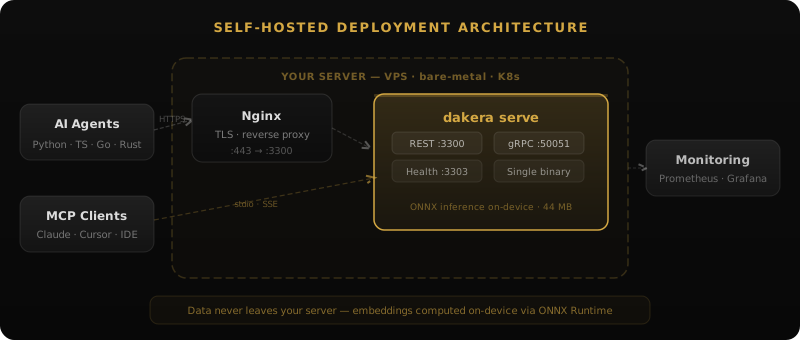
Self-hosted AI memory eliminates these concerns. You control the hardware, the encryption keys, the retention policies, and the network boundaries. For organizations building agents that handle medical records, financial data, legal documents, or proprietary business logic, self-hosting isn't a preference — it's a requirement.
This guide walks through everything you need to deploy a production-grade self-hosted memory system: from hardware requirements to encryption configuration, from hybrid retrieval tuning to operational monitoring.
Architecture of a Self-Hosted Memory Server
A self-hosted AI memory server needs to handle several concerns simultaneously:
- Storage — persistent, encrypted storage for memories with metadata
- Retrieval — fast similarity search (vector) combined with keyword matching (BM25)
- Embeddings — converting text to vectors without sending data to external APIs
- Temporal reasoning — understanding when memories were created and how they decay
- Access control — namespaces, sessions, and company isolation
Dakera ships all of this as a single Rust binary. No Docker compose files with 6 services, no managed vector database subscriptions, no external embedding API calls. You download the binary, set an encryption key, and start it.
On-Device Embeddings
The most common privacy leak in "self-hosted" memory systems is the embedding step. If you're sending text to OpenAI's embedding API to generate vectors, you've already sent your data off-premise. Dakera runs ONNX-based embedding models locally — MiniLM, BGE, and E5 variants are supported out of the box. The embedding computation happens on your CPU or GPU, and no text ever leaves the machine.
# Configure via environment variable
export DAKERA_MODEL="bge-small-en-v1.5"  # or "minilm-l6-v2", "e5-small-v2"
Deployment: From Zero to Production
Hardware Requirements
| Scale | Memories | RAM | CPU | Disk |
|---|---|---|---|---|
| Development | < 10K | 512 MB | 1 core | 1 GB |
| Small team | 10K - 100K | 2 GB | 2 cores | 10 GB |
| Production | 100K - 1M | 8 GB | 4 cores | 50 GB |
| Enterprise | 1M+ | 32 GB | 8+ cores | 200 GB+ |
Installation
Run Dakera with Docker (recommended) or Docker Compose:
# Docker (simplest)
docker run -d --name dakera -p 3000:3000   ghcr.io/dakera-ai/dakera:latest

# Docker Compose
curl -sSfL https://raw.githubusercontent.com/Dakera-AI/dakera-deploy/main/docker-compose.yml   -o docker-compose.yml
DAKERA_ROOT_API_KEY=dk-mykey docker compose up -d
Initial Configuration
All configuration is done via environment variables — no config file required:
# Required: set your API key and encryption key
export DAKERA_ROOT_API_KEY="dk-your-api-key-here"
export DAKERA_ENCRYPTION_KEY="your-256-bit-key-here"

# Optional: configure the embedding model (default: bge-small-en-v1.5)
export DAKERA_MODEL="bge-small-en-v1.5"  # or "minilm-l6-v2", "e5-small-v2"

# Start Dakera (Docker — recommended)
docker run -d --name dakera -p 3000:3000   -e DAKERA_ROOT_API_KEY   -e DAKERA_ENCRYPTION_KEY   -e DAKERA_MODEL   -v /var/lib/dakera/data:/data   ghcr.io/dakera-ai/dakera:latest
Encryption at Rest: AES-256-GCM
Every memory stored by Dakera is encrypted before it touches disk. The encryption uses AES-256-GCM, which provides both confidentiality and authentication — meaning tampered data is detected and rejected on read.
The encryption key never leaves your infrastructure. Dakera supports loading it from environment variables, file paths, or external secret managers via a plugin interface. If the server process is terminated, the data on disk is indistinguishable from random bytes without the key.
Unlike cloud memory services where the provider holds encryption keys, self-hosted deployment means you are the only entity that can decrypt your agent's memories.
Hybrid Retrieval: HNSW + BM25
A common mistake in memory systems is relying solely on vector similarity. Vectors excel at semantic matching but fail on exact terms — product names, error codes, specific dates. BM25 excels at exact matching but misses paraphrases and semantic relationships.
Dakera's hybrid retrieval combines both approaches. When a query arrives, it runs in parallel against the HNSW vector index and the BM25 inverted index, then merges results using reciprocal rank fusion:
# Python SDK example: hybrid retrieval
from dakera import DakeraClient

client = DakeraClient(base_url="http://localhost:3000")

# Store a memory
client.memories.store(
    agent_id="project-alpha",
    content="The deployment to us-east-1 failed at 14:32 UTC due to OOM on node k8s-worker-3",
    tags=["incident", "deployment"],
    importance=0.9
)

# Retrieve with hybrid search (default mode)
results = client.memories.recall(
    agent_id="project-alpha",
    query="what caused the deployment failure?",
    top_k=5
)

# Results combine semantic understanding ("deployment failure")
# with exact term matching ("us-east-1", "OOM", "k8s-worker-3")
Namespace Isolation
In a self-hosted deployment serving multiple agents or teams, namespace isolation ensures that one agent's memories never leak into another's retrieval results. Each namespace maintains its own HNSW index, BM25 index, and knowledge graph.
# Each agent gets its own namespace
client.memories.store(agent_id="agent-support", content="...")
client.memories.store(agent_id="agent-sales", content="...")

# Searches are scoped — no cross-contamination
results = client.memories.recall(agent_id="agent-support", query="...")
# Only returns memories from agent-support
For multi-tenant deployments, Dakera also supports company-level isolation, where each company gets a completely separate data directory with its own encryption key.
Security Hardening
Running a memory server that holds sensitive agent context requires treating it with the same rigor as any production data store. The following hardening steps are recommended for any deployment that moves beyond a developer laptop.
Operating System Firewall (UFW)
Limit network access to only the ports Dakera legitimately needs. Dakera listens on port 3000 for all HTTP traffic — REST, health checks, and metrics. Only expose what your architecture requires:
# Install UFW if not already present
sudo apt install ufw -y

# Default deny all inbound, allow all outbound
sudo ufw default deny incoming
sudo ufw default allow outgoing

# Allow SSH
sudo ufw allow 22/tcp

# Allow Dakera REST API — only from your application servers
sudo ufw allow from 10.0.1.0/24 to any port 3000 proto tcp

sudo ufw enable
sudo ufw status verbose
Never expose port 3000 to the public internet without TLS termination and authentication. The Dakera API key provides authentication but not encryption in transit — add a reverse proxy for that.
Brute-Force Protection with fail2ban
Even with a firewall, any internet-accessible port can receive automated credential stuffing attempts. Install fail2ban to automatically ban IP addresses that make repeated failed requests:
# Install fail2ban
sudo apt install fail2ban -y

# Create a Dakera-specific jail
sudo tee /etc/fail2ban/jail.d/dakera.conf <<'EOF'
[dakera-api]
enabled  = true
port     = 3000
logpath  = /var/log/dakera/access.log
filter   = dakera-api
maxretry = 10
findtime = 600
bantime  = 3600
ignoreip = 127.0.0.1/8 10.0.0.0/8
EOF

# Create the filter to match 401 responses
sudo tee /etc/fail2ban/filter.d/dakera-api.conf <<'EOF'
[Definition]
failregex = ^.* 401 .* <HOST> .*$
ignoreregex =
EOF

sudo systemctl enable fail2ban
sudo systemctl restart fail2ban
Running Dakera as a Non-Root System User
Never run the Dakera binary as root. Create a dedicated system user with minimal permissions and use systemd security directives to constrain the process:
# Create a system user (no login shell, no home directory)
sudo useradd --system --no-create-home --shell /usr/sbin/nologin dakera

# Set ownership of config and data directories
sudo mkdir -p /etc/dakera /var/lib/dakera /var/log/dakera
sudo chown -R dakera:dakera /etc/dakera /var/lib/dakera /var/log/dakera
sudo chmod 750 /etc/dakera /var/lib/dakera

# Create the systemd service
sudo tee /etc/systemd/system/dakera.service <<'EOF'
[Unit]
Description=Dakera AI Memory Server
After=network.target

[Service]
Type=simple
User=dakera
Group=dakera
ExecStart=/usr/local/bin/dakera serve --config /etc/dakera/dakera.toml
Restart=on-failure
RestartSec=5s
StandardOutput=append:/var/log/dakera/dakera.log
StandardError=append:/var/log/dakera/dakera-error.log
EnvironmentFile=/etc/dakera/dakera.env
NoNewPrivileges=true
PrivateTmp=true
ProtectSystem=strict
ReadWritePaths=/var/lib/dakera /var/log/dakera

[Install]
WantedBy=multi-user.target
EOF

sudo systemctl daemon-reload
sudo systemctl enable dakera
sudo systemctl start dakera
TLS and Reverse Proxy Setup
Dakera's REST and gRPC servers do not include a built-in TLS layer — the recommended approach is to terminate TLS at a reverse proxy and forward to Dakera on localhost. Caddy is recommended because it provisions and renews Let's Encrypt certificates automatically with zero configuration:
# Install Caddy on Debian/Ubuntu
sudo apt install -y debian-keyring debian-archive-keyring apt-transport-https curl
curl -1sLf 'https://dl.cloudsmith.io/public/caddy/stable/gpg.key'     | sudo gpg --dearmor -o /usr/share/keyrings/caddy-stable-archive-keyring.gpg
curl -1sLf 'https://dl.cloudsmith.io/public/caddy/stable/debian.deb.txt'     | sudo tee /etc/apt/sources.list.d/caddy-stable.list
sudo apt update && sudo apt install caddy -y

# /etc/caddy/Caddyfile
sudo tee /etc/caddy/Caddyfile <<'EOF'
memory.yourdomain.com {
    reverse_proxy localhost:3000 {
        header_up X-Real-IP {remote_host}
    }
}
EOF

sudo systemctl enable caddy
sudo systemctl reload caddy
With Caddy running, update your MCP client configurations to point to https://memory.yourdomain.com. See the MCP setup guide for the exact configuration snippet for Claude Desktop, Claude Code, Cursor, and Windsurf.
Monitoring with Prometheus and Grafana
A memory server that silently goes down or degrades in quality will cause your agents to fail in confusing ways — the LLM will lose context without any explicit error. Set up monitoring to catch problems before your users do.
Dakera exposes a Prometheus-compatible metrics endpoint at /metrics on port 3000. Add it to your Prometheus scrape configuration:
# prometheus.yml scrape config
scrape_configs:
  - job_name: 'dakera'
    static_configs:
      - targets: ['localhost:3000']
    scrape_interval: 15s
    metrics_path: /metrics
Key metrics and recommended alert thresholds:
| Metric | Type | Alert Threshold |
|---|---|---|
dakera_memories_total | Gauge | Alert if drops unexpectedly |
dakera_searches_total | Counter | Rate drop indicates connection issue |
dakera_search_latency_p50_ms | Gauge | Alert if > 200ms sustained |
dakera_search_latency_p99_ms | Gauge | Alert if > 1000ms |
dakera_store_errors_total | Counter | Alert if rate > 0 |
dakera_index_size_bytes | Gauge | Monitor for disk planning |
Prometheus alert rules for the most critical failure modes:
# /etc/prometheus/rules/dakera.yml
groups:
  - name: dakera
    rules:
      - alert: DakeraDown
        expr: up{job="dakera"} == 0
        for: 1m
        labels:
          severity: critical
        annotations:
          summary: "Dakera memory server is down"
          description: "Agents will lose memory context immediately"

      - alert: DakeraHighSearchLatency
        expr: dakera_search_latency_p99_ms > 1000
        for: 5m
        labels:
          severity: warning
        annotations:
          summary: "Dakera p99 search latency exceeds 1s"

      - alert: DakeraStoreErrors
        expr: rate(dakera_store_errors_total[5m]) > 0
        for: 2m
        labels:
          severity: critical
        annotations:
          summary: "Dakera is failing to store memories — check disk and encryption key"
For a Grafana dashboard, import the community Dakera dashboard or build a board with panels for: search latency heatmap (p50/p95/p99), memory count by namespace, searches per second, and index size over time. See the monitoring & observability section of the deployment guide for Prometheus configuration and metric descriptions.
Backup Strategies and Restore Procedures
Agent memories represent accumulated context that is expensive to recreate. A deployment without backup is a deployment that will eventually lose data. Dakera's single-directory data model makes backup straightforward — no complex export procedures or database dumps required.
Automated Daily Backups
The following script creates a consistent, frozen backup and ships it to S3-compatible storage. Because Dakera's at-rest encryption is AES-256-GCM, the archive is already encrypted and can be stored on any cloud provider without additional encryption at the destination:
#!/usr/bin/env bash
# /usr/local/bin/dakera-backup.sh
set -euo pipefail

DAKERA_API_URL="http://localhost:3000"
DAKERA_API_KEY="${DAKERA_ROOT_API_KEY}"
BACKUP_BUCKET="s3://your-bucket/dakera-backups"
DATE=$(date +%Y%m%d-%H%M%S)

echo "[$(date)] Starting Dakera backup..."

# Trigger a server-side backup via the admin API
BACKUP_ID=$(curl -sf -X POST "${DAKERA_API_URL}/admin/backups" \
  -H "Authorization: Bearer ${DAKERA_API_KEY}" | jq -r '.id')

if [ -z "${BACKUP_ID}" ]; then
    echo "ERROR: Backup creation failed" >&2
    exit 1
fi

echo "[$(date)] Backup created: ${BACKUP_ID}"

# Download the compressed backup bundle
BACKUP_FILE="/tmp/dakera-${DATE}.tar.zst"
curl -sf -o "${BACKUP_FILE}" \
  "${DAKERA_API_URL}/admin/backups/${BACKUP_ID}/download" \
  -H "Authorization: Bearer ${DAKERA_API_KEY}"

# Upload to S3-compatible storage
aws s3 cp "${BACKUP_FILE}" "${BACKUP_BUCKET}/${DATE}/"
rm "${BACKUP_FILE}"

echo "[$(date)] Backup complete: ${BACKUP_ID}"
Schedule this with cron to run nightly and after any significant memory ingestion event:
# /etc/cron.d/dakera-backup
0 2 * * * dakera /usr/local/bin/dakera-backup.sh >> /var/log/dakera/backup.log 2>&1
Restore Procedure
Always test your restore procedure before you need it in an emergency. The restore process for Dakera is deterministic:
# 1. Stop Dakera
sudo systemctl stop dakera

# 2. Download backup from S3
aws s3 cp "s3://your-bucket/dakera-backups/20260520-020000/"     /tmp/restore/ --recursive
BACKUP_FILE="/tmp/restore/dakera-20260520-020000.tar.gz"

# Verify archive integrity
tar -tzf "${BACKUP_FILE}" > /dev/null && echo "Archive is valid"

# 3. Move aside the current data directory (safety net)
sudo mv /var/lib/dakera/data     /var/lib/dakera/data.pre-restore.$(date +%Y%m%d)

# 4. Restore
sudo tar -xzf "${BACKUP_FILE}" -C /var/lib/dakera/
sudo chown -R dakera:dakera /var/lib/dakera/data

# 5. Start Dakera and verify
sudo systemctl start dakera
curl http://localhost:3000/health
High-Availability Setup
For deployments where downtime is not acceptable, an active-passive setup provides automatic failover. The pattern uses two Dakera instances sharing a volume (NFS or cloud-managed shared block store) with only one active at a time:
# Architecture:
# Agents / MCP clients
#        |
#   HAProxy (polls /health on :3000)
#       /        # Primary      Standby
# Dakera        Dakera
#                /
#     Shared NFS volume
#   /var/lib/dakera/data

# HAProxy backend configuration
backend dakera_backend
    balance roundrobin
    option httpchk GET /health HTTP/1.1
    http-check expect status 200
    server primary  10.0.1.10:3000 check port 3000 inter 5s fall 3 rise 2
    server standby  10.0.1.11:3000 check port 3000 inter 5s fall 3 rise 2 backup
The backup keyword in HAProxy ensures the standby only receives traffic when the primary fails health checks. This prevents simultaneous writes from two processes to the same HNSW index, which would corrupt it. When the primary recovers, HAProxy automatically routes traffic back to it.
For read-heavy workloads, you can scale horizontally by running multiple read-only Dakera replicas against a periodically synced copy of the data directory. This supports scenarios where many agents concurrently query accumulated long-term context. For more on multi-agent architectures that leverage this pattern, see the multi-agent memory systems guide.
Network Security
Since Dakera runs on your infrastructure, you control the network boundaries:
- Bind to localhost if your agents run on the same machine
- Use a private network (VPC, VLAN) for distributed deployments
- Place behind a reverse proxy (nginx, Caddy) for TLS termination
- Firewall rules — only allow connections from known agent IPs
# Bind only to localhost for same-machine agents
[server]
host = "127.0.0.1"
port = 3000

# Or bind to a private interface
[server]
host = "10.0.1.5"
port = 3000
Operational Monitoring
Self-hosted means you're responsible for uptime. Dakera exposes a health endpoint and metrics for integration with your existing monitoring stack:
# Health check
curl http://localhost:3000/health
# {"status": "healthy", "version": "0.11.55", "uptime_seconds": 86400}

# Metrics (Prometheus-compatible)
curl http://localhost:3000/metrics
# dakera_memories_total{namespace="agent-support"} 45231
# dakera_searches_total{namespace="agent-support"} 12847
# dakera_search_latency_p99_ms{namespace="agent-support"} ...
Backup and Disaster Recovery
Since all data lives in a single directory, backups are straightforward:
# Create a consistent backup via the admin API
curl -X POST http://localhost:3000/admin/backups   -H "Authorization: Bearer $DAKERA_ROOT_API_KEY"
# {"id":"bk_20260724_020000","status":"completed","size_bytes":4521984}

# Download the backup bundle
curl -o dakera-backup-$(date +%Y%m%d).tar.zst   http://localhost:3000/admin/backups/bk_20260724_020000/download   -H "Authorization: Bearer $DAKERA_ROOT_API_KEY"
The encrypted backup can be stored on any medium — cloud object storage, tape, another server — without compromising privacy, since it's AES-256-GCM encrypted and useless without the key.
Comparison: Self-Hosted vs. Cloud Memory
| Concern | Cloud Memory (Mem0, Zep) | Self-Hosted (Dakera) |
|---|---|---|
| Data residency | Provider's region | Your hardware, your jurisdiction |
| Encryption keys | Provider-managed | You hold the only copy |
| Embedding privacy | Text sent to external API | On-device ONNX inference |
| Network exposure | Public internet | Private network, your firewall |
| Cost at scale | Per-query pricing | Fixed infrastructure cost |
| Latency | Network round-trip | Local, no network hop |
| Compliance (HIPAA, SOC2) | Depends on provider | Your controls, your audit |
When to Self-Host
Self-hosted AI memory is the right choice when:
- Your agents process PII, PHI, or classified information
- Regulatory requirements mandate data residency (GDPR, HIPAA, FedRAMP)
- You need predictable costs at scale (no per-query fees)
- Low latency is critical (same-network retrieval vs. internet round-trip)
- You want full control over retention policies and data lifecycle
If you're prototyping with non-sensitive data and don't need compliance guarantees, a cloud solution might be simpler to start with. But for production agents handling real user data, self-hosting gives you control that no SLA can match.
Getting Started in 5 Minutes
Here's the fastest path from zero to a working self-hosted memory server:
# 1. Start Dakera
docker run -d --name dakera -p 3000:3000   ghcr.io/dakera-ai/dakera:latest

# 2. Store a memory
curl -X POST http://localhost:3000/v1/memory/store \
  -H "Authorization: Bearer your-key" \
  -H "Content-Type: application/json" \
  -d '{"agent_id": "test", "content": "The user prefers dark mode and vim keybindings"}'

# 3. Recall by meaning
curl -s -X POST http://localhost:3000/v1/memory/recall \
  -H "Authorization: Bearer your-key" \
  -H "Content-Type: application/json" \
  -d '{"agent_id": "test", "query": "what are the user preferences", "top_k": 5}'
For a full production deployment guide with systemd, TLS, and monitoring, see the quickstart documentation.
Once you have a working server, the next step is integrating it with your AI toolchain. If you use Claude Desktop, Claude Code, Cursor, or Windsurf, the MCP memory server setup guide covers exact configuration for each tool in under 10 minutes. For teams evaluating whether Dakera fits their use case versus other frameworks, the 2026 framework comparison provides a side-by-side analysis with benchmark data.
Related: Deployment documentation · Security hardening guide · Configuration reference · Why Rust for AI Memory · Dakera vs Mem0 self-hosting
Deploy your self-hosted memory layer today
44 MB binary, one env var, runs on any VM. No cloud dependency, full data sovereignty — memory contents never leave your infrastructure. Free to self-host forever. (Anonymous version telemetry is sent by default; opt out with DAKERA_TELEMETRY=off.)