 DAKERA
What is the Model Context Protocol?
The Model Context Protocol (MCP) is a standard that allows AI models to invoke external tools during a conversation. Instead of the application code calling an API and injecting results into the prompt, the model itself decides when to call a tool, what parameters to pass, and how to use the result.
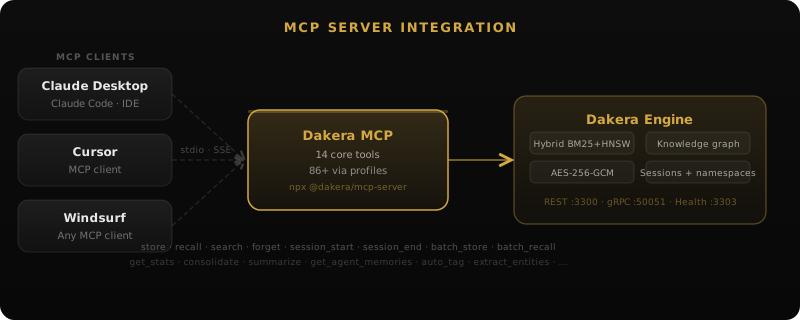
Think of MCP as a USB-C port for AI models — a standardized interface that any tool can implement, and any MCP-compatible model can use without custom integration code.
Before MCP, giving an AI agent access to memory required custom orchestration:
# Pre-MCP: application orchestrates everything
user_message = "What did I say about my budget last week?"

# 1. Application decides to search memory (custom logic)
memories = memory_api.search(query=user_message, limit=5)

# 2. Application injects results into prompt (manual formatting)
prompt = f"Context from memory:\n{format_memories(memories)}\n\nUser: {user_message}"

# 3. Model generates response (no awareness of memory system)
response = llm.complete(prompt)
With MCP, the model handles this autonomously:
# With MCP: model decides when and how to use memory
# The model sees available tools and calls them as needed:

# Model internally decides: "I should search memory for this"
# Model calls: dakera_recall(agent_id="user-123", query="budget discussion", top_k=5)
# Model receives results and incorporates them into its response
# No application orchestration needed
How MCP Works: The Protocol
MCP uses a JSON-RPC-based communication protocol between the model host (client) and tool servers. The lifecycle has three phases:
1. Discovery
When a model session starts, the client connects to configured MCP servers and discovers available tools:
// Client -> Server: list available tools
{"jsonrpc": "2.0", "method": "tools/list", "id": 1}

// Server -> Client: tool definitions
{
  "jsonrpc": "2.0",
  "id": 1,
  "result": {
    "tools": [
      {
        "name": "dakera_store",
        "description": "Store a new memory",
        "inputSchema": {
          "type": "object",
          "properties": {
            "agent_id": {"type": "string"},
            "content": {"type": "string"},
            "importance": {"type": "number", "minimum": 0, "maximum": 1}
          },
          "required": ["agent_id", "content"]
        }
      },
      {
        "name": "dakera_recall",
        "description": "Recall memories by semantic similarity",
        "inputSchema": { ... }
      }
      // ... 12 more core tools
    ]
  }
}
2. Invocation
During conversation, the model decides to call a tool and the client forwards the request:
// Client -> Server: invoke a tool
{
  "jsonrpc": "2.0",
  "method": "tools/call",
  "id": 2,
  "params": {
    "name": "dakera_recall",
    "arguments": {
      "agent_id": "user-conversations",
      "query": "budget discussion last week",
      "top_k": 5
    }
  }
}

// Server -> Client: tool result
{
  "jsonrpc": "2.0",
  "id": 2,
  "result": {
    "content": [
      {
        "type": "text",
        "text": "[{\"id\": \"mem_abc\", \"content\": \"User mentioned Q3 budget is $50k...\", \"score\": 0.89}]"
      }
    ]
  }
}
3. Continuation
The model incorporates the tool result into its reasoning and continues generating a response. It may call additional tools if needed — for example, searching memory, then updating a knowledge graph edge based on what it found.
Dakera's MCP Tools: 14 Core + Profiles
Dakera loads 14 core tools by default — covering memory, search, sessions, and knowledge graphs. For advanced use cases, 86+ total tools are available via profiles. Any MCP-compatible model (Claude, GPT-4, Gemini, local models with MCP support) can directly interact with the memory system. Tools are organized into categories:
| Category | Examples (core tools) |
|---|---|
| Memory | dakera_store, dakera_recall, dakera_forget, dakera_batch_recall, dakera_batch_forget |
| Search | dakera_search, dakera_hybrid_search, dakera_fulltext_search |
| Knowledge Graph | dakera_knowledge_graph |
| Sessions | dakera_session_start, dakera_session_end |
| Extraction | dakera_extract |
| Tool Discovery | dakera_discover_tools, dakera_load_tools |
Profile Selection: DAKERA_MCP_PROFILE
Not every agent needs 86+ tools in its context window. The DAKERA_MCP_PROFILE environment variable controls which subset appears in tools/list:
- core (default) — 14 tools, ~2,964 tokens. Store, recall, search, sessions, knowledge graphs.
- admin — 32 tools, ~5,975 tokens. Adds namespaces, API keys, policies, decay config.
- power — 68 tools, ~13,014 tokens. Adds entity extraction, graph traversal, agent stats.
- all — 86 tools, ~16,026 tokens. Full API surface including vectors and bulk ops.
Agents on the core profile can still access any tool on demand using dakera_discover_tools and dakera_load_tools — two meta-tools included in every profile.
Setting Up Dakera as an MCP Server
Dakera runs as an MCP server using stdio transport (for local models) or SSE transport (for remote connections). Configuration is typically done in your model client's MCP settings.
Claude Desktop / Claude Code
// .mcp.json or claude_desktop_config.json
{
  "mcpServers": {
    "dakera": {
      "command": "dakera-mcp",
      "env": {
        "DAKERA_API_URL": "http://localhost:3000",
        "DAKERA_API_KEY": "your-api-key",
        "DAKERA_MCP_PROFILE": "core"
      }
    }
  }
}
Custom MCP Client
// For applications building their own MCP client
import { Client } from "@modelcontextprotocol/sdk/client/index.js";
import { StdioClientTransport } from "@modelcontextprotocol/sdk/client/stdio.js";

const transport = new StdioClientTransport({
  command: "dakera-mcp"
});

const client = new Client({
  name: "my-agent",
  version: "1.0.0"
});

await client.connect(transport);

// List available tools
const tools = await client.listTools();
console.log(`Dakera exposes ${tools.tools.length} MCP tools`);

// Call a tool
const result = await client.callTool({
  name: "dakera_recall",
  arguments: {
    agent_id: "user-data",
    query: "user preferences",
    limit: 5
  }
});
Why MCP Matters for Agent Memory
The Model Decides When to Remember
Without MCP, your application code must decide when to store and retrieve memories. You write heuristics: "after every user message, search memory" or "store important facts after each turn." These heuristics are brittle and miss edge cases.
With MCP, the model itself decides when memory operations are needed. It can:
- Search memory proactively before answering a question
- Store a fact immediately when the user shares something important
- Update the knowledge graph when it discovers a relationship
- Check temporal context when a question involves time
Reduced Integration Complexity
Instead of writing custom integration code for each model provider, you implement the MCP server once and it works with every MCP-compatible client. Adding memory to a new agent framework becomes a single configuration line rather than a custom integration.
Tool Composition
Models can compose multiple MCP tools in a single turn. A model might:
- Call
dakera_recallto find relevant context - Call
dakera_knowledge_graphto understand entity relationships - Call
dakera_storeto store a new insight - Call
dakera_extractto record newly discovered entities
All within a single conversation turn, autonomously.
MCP Tool Design Principles
Dakera's MCP tools follow several design principles that make them effective for model consumption:
Descriptive Tool Names
Tool names use a consistent dakera_ prefix: dakera_recall, dakera_store, dakera_knowledge_graph. Models parse these intuitively and the prefix avoids collisions with other MCP servers.
Rich Descriptions
Each tool has a detailed description that helps the model understand when and how to use it:
{
  "name": "dakera_recall",
  "description": "Recall memories by semantic similarity and keyword matching. Use this when you need to recall information the user previously shared or when answering questions that might require historical context. Returns ranked results with relevance scores.",
  "inputSchema": { ... }
}
Sensible Defaults
Optional parameters have defaults that work for common cases. A model can call dakera_recall with just an agent_id and query — top_k defaults to 5 and the mode defaults to hybrid.
Structured Output
Tool results are JSON-structured so models can parse and reason about them:
// dakera_recall result
{
  "memories": [
    {
      "id": "mem_7f3a2b",
      "content": "User prefers dark mode and monospace fonts for code",
      "score": 0.92,
      "created_at": "2026-05-14T10:30:00Z",
      "importance": 0.8,
      "namespace": "preferences"
    }
  ],
  "total_matches": 12,
  "search_time_ms": 8
}
Common MCP Memory Patterns
Pattern: Auto-Remember
The model stores important information without being told to:
// User says: "My team uses Python 3.11 and we deploy to AWS EKS"
// Model recognizes this as valuable context and calls:
dakera_store({
  agent_id: "user-context",
  content: "Team uses Python 3.11, deploys to AWS EKS",
  importance: 0.7,
  metadata: { category: "tech-stack" }
})
Pattern: Contextual Recall
The model checks memory before answering questions that might have personalized answers:
// User asks: "What testing framework should I use?"
// Model calls dakera_recall first to check for existing context:
dakera_recall({
  agent_id: "user-context",
  query: "testing framework preferences tech stack",
  top_k: 3
})
// If it finds "Team uses pytest with coverage > 90% policy"
// it tailors the recommendation accordingly
Pattern: Graph Building
The model builds understanding of the user's world over time:
// User mentions: "Alice from my team reviewed the PR"
// Model extracts and stores the relationship:
dakera_store({
  agent_id: "user-world",
  content: "Alice is a code reviewer on the team — she reviewed a PR",
  metadata: { entity: "person", name: "Alice", role: "code reviewer" }
})
// Dakera auto-extracts entities and relationships from stored content
Security Considerations
MCP tools have full access to the memory system, which means a compromised or misbehaving model could:
- Delete memories (use read-only tool subsets for untrusted models)
- Exfiltrate data through tool calls (monitor tool call logs)
- Poison the knowledge graph with false relationships
Dakera mitigates these risks through:
- Tool filtering — expose only the tools each agent needs
- Namespace ACLs — restrict which namespaces each MCP session can access
- Audit logging — every MCP tool call is logged with the session context
- Rate limiting — prevent runaway tool calls from filling storage
MCP vs. REST API
Dakera exposes the same capabilities through both MCP (for model-initiated access) and REST API (for application-initiated access). Choose based on your architecture:
| Use MCP when | Use REST API when |
|---|---|
| Model decides when to use memory | Application decides when to use memory |
| Running with MCP-compatible clients | Building custom orchestration |
| Want autonomous agent behavior | Want deterministic control flow |
| Prototyping agent capabilities | Production pipelines with strict SLAs |
Many production systems use both: MCP for the model's autonomous memory operations, and REST API for application-level operations like backup, monitoring, and batch ingestion.
For a deeper dive into setting up Dakera as an MCP server, see the MCP Server documentation or follow the step-by-step setup guide.
Implementation patterns: Session Handoff · Multi-Agent Shared Memory · Namespace Isolation
Add persistent memory to any MCP-compatible tool
Dakera ships as a native MCP server. Connect Claude Desktop, Cursor, Windsurf, or any MCP client in minutes — persistent memory across all your AI tools.