 DAKERA
The Model Context Protocol (MCP) is Anthropic's open standard for connecting AI agents to external tools and data sources. It defines a clean JSON-RPC interface between a host (Claude Desktop, Cursor, Windsurf, or any compatible client) and a server that exposes capabilities. Think of it as USB-C for AI tools — one connector, universal compatibility.
But MCP was designed for stateless tool calls: read a file, query a database, send a message. What happens when the tool itself is the memory layer? When the server doesn't just answer questions — it remembers everything, connects concepts across sessions, and makes your agent smarter over time?
That's what dakera-mcp does. It exposes the full Dakera memory engine as 14 core MCP tools (86+ available via profiles). Your agent doesn't need custom code to persist memories, build knowledge graphs, or search across past sessions. It just connects — and remembers.
Zero configuration memory. Any MCP-compatible AI client gains persistent, cross-session memory by adding a single entry to its configuration file. No code changes, no SDK integration, no database setup.
14 Core Tools + Smart Profiles
Most MCP servers expose a handful of tools — maybe 5 to 10. Dakera gives you 14 core tools out of the box, covering everything most agents need. Power users can unlock 86+ total tools via profiles — the complete memory API surface that production agent systems actually need. Every operation is a single tool call away.
Each tool follows the MCP specification exactly — typed input schemas, structured output, proper error codes. Claude and other LLM clients can discover the full tool list, understand the parameters, and call them without any prompt engineering on your part.
Installation and Configuration
The dakera-mcp binary is a standalone Rust executable. No Python, no Node.js, no runtime dependencies. Install it in seconds:
Install via Cargo
# Install the MCP server binary
cargo install dakera-mcp

# Verify installation
dakera-mcp --version
Install via Docker
# Pull the MCP server image
docker pull ghcr.io/dakera-ai/dakera-mcp:latest
Once installed, you configure your MCP client to connect. Here's the configuration for Claude Desktop:
Claude Desktop Configuration
// ~/Library/Application Support/Claude/claude_desktop_config.json
{
  "mcpServers": {
    "dakera": {
      "command": "dakera-mcp",
      "args": [],
      "env": {
        "DAKERA_API_URL": "http://localhost:3000",
        "DAKERA_API_KEY": "your-api-key",
        "DAKERA_MCP_PROFILE": "core"
      }
    }
  }
}
Cursor Configuration
// .cursor/mcp.json
{
  "mcpServers": {
    "dakera": {
      "command": "dakera-mcp",
      "env": {
        "DAKERA_API_URL": "http://localhost:3000",
        "DAKERA_API_KEY": "your-api-key",
        "DAKERA_MCP_PROFILE": "core"
      }
    }
  }
}
Windsurf Configuration
// ~/.codeium/windsurf/mcp_config.json
{
  "mcpServers": {
    "dakera": {
      "command": "dakera-mcp",
      "env": {
        "DAKERA_API_URL": "http://localhost:3000",
        "DAKERA_API_KEY": "your-api-key",
        "DAKERA_MCP_PROFILE": "core"
      }
    }
  }
}
Claude Code Configuration
// .mcp.json (project root)
{
  "mcpServers": {
    "dakera": {
      "command": "dakera-mcp",
      "env": {
        "DAKERA_API_URL": "http://localhost:3000",
        "DAKERA_API_KEY": "your-api-key",
        "DAKERA_MCP_PROFILE": "core"
      }
    }
  }
}
That's it. Restart your client, and 14 core memory tools appear in your agent's tool list (86+ available via profiles). No SDK, no library imports, no code changes to your prompts or workflows.
Choosing Your Profile (DAKERA_MCP_PROFILE)
The DAKERA_MCP_PROFILE environment variable controls which tools your agent sees in tools/list:
- core (default, 14 tools, ~2,964 tokens) — Store, recall, search, sessions, knowledge graphs. Everything most agents need.
- admin (32 tools, ~5,975 tokens) — Core + namespaces, API keys, policies, decay config. For multi-tenant operators.
- power (68 tools, ~13,014 tokens) — Core + entity extraction, graph traversal, agent stats, feedback, advanced search.
- all (86 tools, ~16,026 tokens) — Full API surface: vectors, bulk ops, export/import, encryption, storage tiers.
Start with core. If your agent needs more, use the built-in dakera_discover_tools and dakera_load_tools meta-tools to pull in specific tools on demand — or switch to power or all for persistent access to the full catalog.
How It Works: A Real Workflow
Let's walk through what happens when an agent with Dakera MCP memory encounters a user across multiple sessions.
Session 1: Learning Preferences
A developer asks their Cursor agent to set up a new project. During the conversation, they mention they prefer Tailwind over vanilla CSS, use pnpm instead of npm, and always want ESLint with the strict config. The agent calls dakera_store for each preference:
// Agent calls dakera_store tool
{
  "tool": "dakera_store",
  "arguments": {
    "content": "User prefers Tailwind CSS over vanilla CSS for all projects",
    "agent_id": "cursor-main",
    "importance": 0.9,
    "metadata": { "category": "preference", "domain": "tooling" }
  }
}
Session 2: Automatic Recall
Two weeks later, the same developer starts a new project. The agent calls dakera_recall when it needs to make decisions about project scaffolding:
// Agent calls dakera_recall tool
{
  "tool": "dakera_recall",
  "arguments": {
    "query": "user preferences for CSS framework and package manager",
    "agent_id": "cursor-main",
    "top_k": 5
  }
}

// Dakera returns relevant memories:
// - "User prefers Tailwind CSS over vanilla CSS" (score: 0.94)
// - "User uses pnpm, not npm" (score: 0.91)
// - "Always configure ESLint strict mode" (score: 0.87)
The agent now scaffolds with Tailwind, pnpm, and strict ESLint — without the developer repeating themselves. The memory persisted across sessions, survived a client restart, and was retrieved by semantic meaning rather than keyword match.
Session 5: Knowledge Graph Traversal
After several sessions, the agent has accumulated memories about the user's projects, team members, deployment targets, and architectural decisions. Using dakera_graph_traverse, it can answer questions like "What deployment approach does this user's team use for Next.js projects?" by following entity links across many memories:
// Agent traverses the knowledge graph
{
  "tool": "dakera_graph_traverse",
  "arguments": {
    "start_entity": "user-team",
    "relation": "deploys_with",
    "depth": 2
  }
}
This is memory that gets smarter over time — not just a key-value store, but a connected graph of knowledge that agents can reason over.
Why Native MCP vs. Wrapper Approaches
There are other ways to give agents memory over MCP. You could wrap a Python memory library in a thin MCP server. You could proxy calls through a Node.js process. Some teams even use shell scripts that curl an external API. Here's why dakera-mcp takes a fundamentally different approach:
| Approach | Startup | Memory | Dependencies | Latency |
|---|---|---|---|---|
| dakera-mcp (Rust) | <50ms | ~8MB | None | <2ms overhead |
| Python wrapper | 2-5s | ~200MB | Python + pip packages | 10-50ms overhead |
| Node.js wrapper | 1-3s | ~120MB | Node + npm packages | 5-20ms overhead |
| Shell/curl proxy | <100ms | ~4MB | curl, jq | 50-200ms (process spawn) |
The Rust binary approach gives you three critical advantages:
- Instant startup. MCP clients spawn the server process on demand. A 5-second Python startup means your first tool call hangs for 5 seconds. dakera-mcp is ready in under 50 milliseconds.
- Single process, zero dependencies. No virtual environments, no node_modules, no version conflicts. One binary works on macOS, Linux, and Windows. You can
cargo installit or drop the binary in your PATH. - Native protocol handling. The MCP JSON-RPC protocol runs directly in the binary — no serialization overhead from crossing language boundaries, no garbage collection pauses during tool calls.
Production detail: dakera-mcp communicates with the Dakera server over its HTTP API. The MCP binary itself is stateless — all persistence lives in the Dakera server. This means you can restart, upgrade, or replace the MCP binary without losing any memory data.
Tool Categories in Depth
Let's break down what each tool category enables for your agent workflows.
Memory Operations (12 tools)
The core memory surface. These tools handle the fundamental store-and-recall loop that makes agents persistent:
dakera_store— Persist a memory with content, importance, metadata, and optional session bindingdakera_recall— Semantic recall by query string, with configurable scoring and limitsdakera_search— Filtered search across memories with metadata constraintsdakera_forget— Remove specific memories (GDPR compliance, user requests)dakera_memory_update— Modify existing memories without creating duplicatesdakera_memory_get— Retrieve a specific memory by IDdakera_memory_importance— Adjust importance scoring for relevance tuningdakera_memory_feedback— Provide positive/negative feedback on recall resultsdakera_memory_export— Export all memories for backup or migrationdakera_memory_import— Bulk import memories from external sourcesdakera_batch_recall— Recall multiple queries in a single round-tripdakera_batch_forget— Bulk deletion for cleanup operations
Session Management (5 tools)
Sessions give logical structure to memory. An agent can group related memories under a session, retrieve everything from a specific session, and manage session lifecycles:
dakera_session_start— Open a new session with optional metadatadakera_session_end— Close a session, triggering any configured consolidationdakera_session_list— List all sessions for an agent, with filteringdakera_session_get— Get session metadata and summarydakera_session_memories— Retrieve all memories within a specific session
Vector Operations (14 tools)
Direct access to the underlying vector engine for advanced use cases — custom embeddings, batch operations, and similarity explanations:
dakera_vector_upsert— Insert or update vectors with metadatadakera_vector_query— Query by vector for custom embedding modelsdakera_vector_multi_search— Search across multiple vector spaces simultaneouslydakera_vector_batch_query— Batch multiple queries in one calldakera_vector_explain— Get scoring breakdowns for search resultsdakera_vector_aggregate— Statistical aggregations over vector collectionsdakera_vector_warm— Pre-warm caches for latency-sensitive pathsdakera_vector_export— Export vector data for analysis or migrationdakera_vector_count— Get collection statisticsdakera_vector_delete/dakera_vector_bulk_delete— Remove vectorsdakera_vector_bulk_update— Batch metadata updatesdakera_vector_upsert_columns— Columnar upsert for structured datadakera_vector_unified_query— Combined vector + metadata filtering in one call
Knowledge Graph (8 tools)
The knowledge graph layer connects memories through entities and relationships. This is what enables multi-hop reasoning — asking "What does this user's team deploy to?" requires traversing user -> team -> deployment-target:
dakera_knowledge_graph— Build or update the knowledge graph from memoriesdakera_graph_traverse— Walk relationships from a starting entity, depth-limited with relation filteringdakera_graph_export— Export the full graph structuredakera_graph_path— Find shortest paths between entitiesdakera_graph_link_memory— Manually link a memory to a graph entitydakera_knowledge_network_cross_agent— Query shared knowledge across agent boundaries
Entity Extraction (6 tools)
Automatic identification of people, projects, technologies, and concepts within memories:
dakera_extract_entities— Extract entities from arbitrary textdakera_extract— General-purpose extraction with configurable patternsdakera_entity_types_get/dakera_entity_types_set— Configure which entity types to detectdakera_extractor_get/dakera_extractor_set— Configure extraction behavior
Full-Text Search (7 tools)
BM25 full-text indexing for keyword-precise retrieval when semantic search is too loose:
dakera_fulltext_index— Index content for full-text searchdakera_fulltext_search— BM25 keyword searchdakera_hybrid_search— Combined vector + BM25 scoringdakera_fulltext_delete— Remove from the full-text indexdakera_fulltext_stats— Index statistics and healthdakera_text_query/dakera_batch_query_text— Text-based query operations
Namespace Management (8 tools)
Namespaces isolate memory between different applications, environments, or tenants:
dakera_namespace_create/dakera_namespace_delete— Lifecycle managementdakera_namespace_configure— Set per-namespace policies (embedding model, decay rate, limits)dakera_namespace_get/dakera_namespace_list— Inspect namespace configurationdakera_namespace_key_create/dakera_namespace_key_delete/dakera_namespace_key_list— Scoped API key management
Admin and Analytics (23 tools)
Operations, monitoring, and intelligence tools for production deployments:
- Decay management:
dakera_decay_config_get,dakera_decay_config_set,dakera_decay_stats— control how memories age and what gets forgotten naturally - Memory policies:
dakera_memory_policy_get,dakera_memory_policy_set— configure storage limits, retention rules, and access controls - Consolidation:
dakera_consolidate,dakera_knowledge_deduplicate,dakera_knowledge_summarize— merge similar memories, remove duplicates, generate summaries - Analytics:
dakera_agent_stats,dakera_agent_memories,dakera_agent_sessions,dakera_agent_feedback_summary— operational visibility into agent behavior - Security:
dakera_encryption_rotate_key,dakera_audit_query— key rotation and audit trail access - Automation:
dakera_autopilot_status,dakera_autopilot_trigger— automated maintenance operations
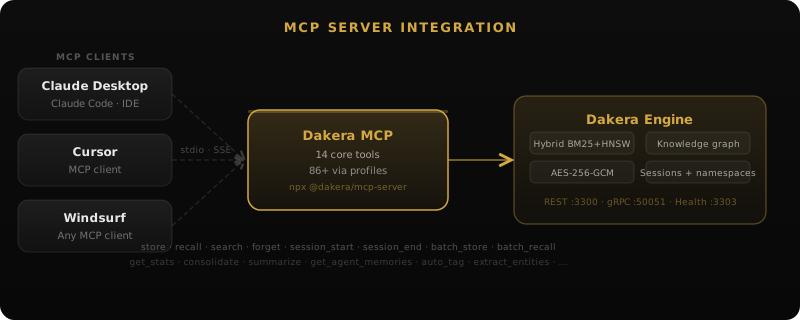
Architecture: How dakera-mcp Connects
The architecture is deliberately simple. The MCP binary sits between your AI client and the Dakera server:
The MCP binary handles:
- Protocol translation — JSON-RPC over stdio (MCP standard) to HTTP REST calls against the Dakera API
- Tool discovery — Responds to
tools/listwith tool schemas for the active profile - Input validation — Validates tool arguments before forwarding to the server
- Error mapping — Translates HTTP errors into proper MCP error responses
- Connection pooling — Maintains persistent HTTP connections to the Dakera server
The binary itself is stateless. All memory data, embeddings, indexes, and graphs live in the Dakera server. You can kill and restart dakera-mcp at any time without data loss.
Real-World Use Cases
dakera-mcp is designed for use cases like:
Development Assistants
Cursor and Windsurf agents that remember your codebase conventions, preferred libraries, deployment targets, and past debugging sessions. The agent builds a mental model of your project over weeks — not just the current file.
Multi-Agent Systems
Multiple agents sharing a namespace can build collective memory. A planning agent stores architectural decisions; an implementation agent recalls them. A review agent tracks recurring feedback patterns. The knowledge graph connects their insights.
Customer Support Agents
Support agents that remember user history, past issues, and resolution patterns. When a user returns with "the same problem as last month," the agent actually knows what that was.
Research and Analysis
Agents that accumulate domain knowledge over hundreds of sessions — paper summaries, data patterns, experimental results. The knowledge graph enables multi-hop queries like "What approaches did we try for X that are related to Y?"
Getting Started in 60 Seconds
Here's the fastest path from zero to persistent agent memory:
# 1. Start a Dakera server (Docker one-liner)
docker run -d -p 3000:3000 -e DAKERA_ROOT_API_KEY=my-key ghcr.io/dakera-ai/dakera:latest

# 2. Install the MCP binary
cargo install dakera-mcp

# 3. Add to your Claude Desktop config
# (see configuration examples above)

# 4. Restart Claude Desktop — 14 core tools (86+ available via profiles) are now available
From here, your agent will automatically discover the available tools. Most LLM clients will use dakera_store and dakera_recall naturally when the conversation warrants it. You can also instruct your agent explicitly: "Remember that I prefer dark mode" or "What do you remember about my deployment setup?"
Tip: For the best experience, add a system instruction like "You have access to persistent memory via Dakera. Store important user preferences and project context. Recall relevant memories before making decisions." This helps the agent use memory proactively rather than only when explicitly asked.
What This Enables
The combination of MCP's universal connectivity and Dakera's full-featured memory engine creates something that wasn't possible before: any AI agent, in any MCP-compatible environment, gains production-grade persistent memory with zero code changes. See the MCP memory server docs or the step-by-step setup guide.
This isn't a demo or a proof of concept. The 14 core tools (86+ available via profiles) cover the full surface area that production agent systems need — from basic store/recall to knowledge graphs, entity extraction, namespace isolation, and operational tooling. It's the same API surface that powers our server's HTTP interface, exposed through the protocol that every major AI client is adopting.
Your agents don't need to be stateless anymore. They don't need custom memory code. They just need a single line in their MCP configuration — and they remember everything.
Integration guides: Cursor · Claude Desktop · Windsurf · Patterns: Session Handoff · Namespace Isolation · Multi-Agent Shared Memory
One line in your MCP config — your agents remember everything
Dakera's MCP server is production-ready today. 14 core tools, full memory API, connects to Claude Desktop, Cursor, or Windsurf in minutes.