 DAKERA
The Multi-Agent Memory Problem
Modern AI applications rarely consist of a single agent. A customer support system might have a triage agent, a technical agent, and a billing agent. A coding assistant might have a planning agent, an implementation agent, and a review agent. Each agent needs its own working memory, but they also need to share relevant context.
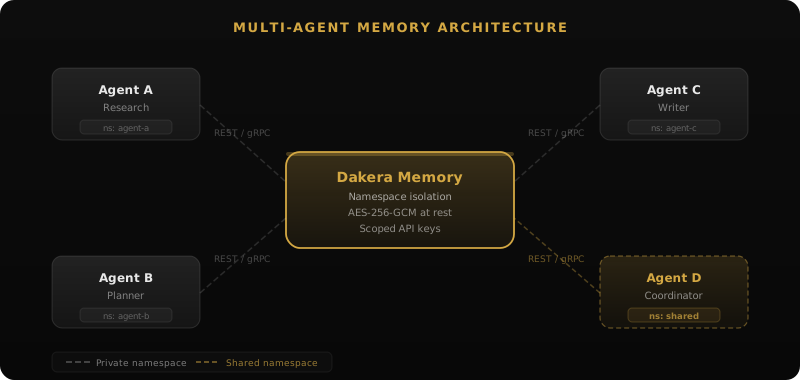
The naive approach — giving every agent access to every memory — creates noise. A billing agent doesn't need to see debugging sessions. A planning agent doesn't need to know about code formatting preferences. The challenge is designing a memory architecture that enables collaboration without creating an undifferentiated soup of context.
Pattern 1: Namespace Isolation with Shared Layers
The most common pattern uses separate namespaces for each agent's private memory, plus a shared namespace for cross-agent context:
from dakera import DakeraClient

client = DakeraClient(base_url="http://localhost:3000")

# Each agent has a private namespace
TRIAGE_NS = "agent-triage"
TECH_NS = "agent-technical"
BILLING_NS = "agent-billing"

# Plus a shared namespace for cross-agent context
SHARED_NS = "shared-customer-context"

# Triage agent stores its observations
client.memories.store(
    agent_id=TRIAGE_NS,
    content="Customer expressed frustration about repeated billing errors"
)

# Triage also writes to shared for other agents
client.memories.store(
    agent_id=SHARED_NS,
    content="Customer cust_42 has ongoing billing issue, handle with care"
)
When the billing agent picks up the conversation, it searches both its own namespace and the shared one:
# Billing agent retrieves context from both namespaces
private_context = client.memories.recall(
    agent_id=BILLING_NS,
    query="customer cust_42 billing history",
    top_k=5
)

shared_context = client.memories.recall(
    agent_id=SHARED_NS,
    query="customer cust_42",
    top_k=3
)
When to Use This Pattern
- Agents have distinct roles with different memory needs
- You want explicit control over what gets shared
- Agents may run on different schedules (async handoffs)
Pattern 2: Session-Based Memory with Agent Scoping
When multiple agents collaborate on a single task in sequence (like a pipeline), sessions provide a natural boundary. Each session represents one unit of work, and agents contribute memories within that session:
# Create a session for this customer interaction
session = client.sessions.start(
    agent_id="support-pipeline"
)

# Triage agent adds to the session
client.memories.store(
    agent_id="support-pipeline",
    content="Initial diagnosis: billing discrepancy on invoice INV-5678"
)

# Technical agent picks up the session and adds its findings
client.memories.store(
    agent_id="support-pipeline",
    content="Root cause: proration calculation error during plan upgrade on March 3"
)

# Billing agent resolves using full session context
session_memories = client.memories.recall(
    agent_id="support-pipeline",
    query="what happened with this billing issue",
    top_k=10
)
When to Use This Pattern
- Agents process work in a pipeline/sequence
- Each unit of work has a clear beginning and end
- You need full audit trail of which agent contributed what
Pattern 3: Knowledge Graph as Shared Context
For complex multi-agent systems where relationships between entities matter more than individual memories, the knowledge graph becomes the shared layer. Each agent contributes entities and relationships, building a collective understanding:
# Research agent stores discoveries as natural language memories
# Dakera auto-extracts entities and builds the knowledge graph
memory = client.memories.store(
    agent_id="company-intelligence",
    content="Alice Chen works at Acme Corp",
    importance=0.8
)

# Sales agent adds deal context
client.memories.store(
    agent_id="company-intelligence",
    content="Acme Corp is considering the Enterprise Plan Q2 deal",
    importance=0.8
)

# Any agent can traverse the graph
connections = client.knowledge.graph(
    agent_id="company-intelligence",
    memory_id=memory.id,
    depth=2
)
# Returns nodes and edges auto-extracted from stored memories
Dakera's knowledge graph supports 4 edge types that cover most agent collaboration scenarios: relates_to, works_at, part_of, and depends_on. Custom edge types can be defined for domain-specific relationships.
When to Use This Pattern
- Agents build understanding of interconnected entities
- The relationships between entities are as important as the entities themselves
- You need multi-hop reasoning across agent discoveries
Pattern 4: Event-Sourced Memory
In systems where agents need to react to each other's discoveries in real-time, an event-sourced pattern works well. Each agent publishes memories as events, and other agents subscribe to relevant namespaces:
# Monitoring agent detects an anomaly
client.memories.store(
    agent_id="system-events",
    content="CPU usage on prod-server-3 exceeded 95% for 5 minutes"
)

# Diagnosis agent polls for new high-severity events
recent_events = client.memories.recall(
    agent_id="system-events",
    query="high severity anomaly",
    top_k=5  # Heavily weight recent events
)
Isolation Guarantees
Regardless of which pattern you choose, multi-agent memory requires strong isolation guarantees. A bug in one agent shouldn't corrupt another's context. Dakera provides isolation at multiple levels:
| Level | Scope | Isolation |
|---|---|---|
| Company | Entire tenant | Separate data directory + encryption key |
| Namespace | Agent or domain | Separate HNSW index + BM25 index |
| Session | Single task/conversation | Filtered within namespace |
| Metadata | Custom scoping | Query-time filtering |
Production Deployment Patterns
Theory and production diverge quickly. Here are the patterns that work in practice for teams running multi-agent systems at scale.
The Hub-and-Spoke Topology
The most common production topology has a single Dakera instance serving all agents, with each agent type owning a dedicated namespace. Agents write to their private namespace and optionally to a shared "hub" namespace for cross-agent communication. This is simple to operate, easy to monitor, and scales to dozens of agents without coordination overhead:
from dakera import DakeraClient
import os

DAKERA_API_URL = os.environ["DAKERA_API_URL"]
DAKERA_API_KEY = os.environ["DAKERA_API_KEY"]

def get_client() -> DakeraClient:
    return DakeraClient(base_url=DAKERA_API_URL, api_key=DAKERA_API_KEY)

class ResearchAgent:
    PRIVATE_NS = "research-private"
    HUB_NS = "hub-intelligence"

    def __init__(self):
        self.client = get_client()

    def store_finding(self, content: str, customer_id: str):
        # Always write to private namespace
        result = self.client.memories.store(
            agent_id=self.PRIVATE_NS,
            content=content
        )
        # Promote high-importance findings to the shared hub
        if result.importance >= 0.7:
            self.client.memories.store(
                agent_id=self.HUB_NS,
                content=content,
                importance=result.importance
            )
Importance-Weighted Promotion
Noisy shared namespaces are one of the most common causes of retrieval degradation in multi-agent systems. Use Dakera's importance scoring as a natural filter — only memories above a threshold are promoted to shared namespaces:
def promote_if_important(client: DakeraClient, content: str,
                          private_ns: str, shared_ns: str,
                          metadata: dict, threshold: float = 0.7):
    """Store privately always; promote to shared only if important enough."""
    result = client.memories.store(
        agent_id=private_ns,
        content=content
    )
    # Dakera computes importance based on content salience and novelty
    if result.importance >= threshold:
        client.memories.store(
            agent_id=shared_ns,
            content=content,
            importance=result.importance
        )
    return result
TypeScript SDK: Cross-Agent Coordination
For teams building with the TypeScript SDK in Node.js or Next.js agent frameworks:
import { DakeraClient } from '@dakera-ai/dakera';

const client = new DakeraClient({
  baseUrl: process.env.DAKERA_API_URL!,
  apiKey: process.env.DAKERA_API_KEY!,
});

// Triage agent writes a handoff note to shared namespace
async function triageHandoff(sessionId: string, customerId: string,
                              summary: string): Promise {
  await client.memories.store({
    agentId: 'shared-handoffs',
    content: summary,
    sessionId,
    importance: 0.85,
  });
}

// Downstream agent reads the handoff before starting work
async function loadHandoffContext(sessionId: string, customerId: string) {
  const results = await client.memories.recall({
    agentId: 'shared-handoffs',
    query: `customer context for ${customerId}`,
    sessionId,
    topK: 5,
    metadataFilter: { customer_id: customerId },
  });
  return results.memories;
}
Failure Modes and Recovery Strategies
Multi-agent memory systems fail in specific, predictable ways. Understanding these failure modes in advance lets you build systems that degrade gracefully rather than catastrophically.
Failure Mode 1: Context Poisoning
A misbehaving agent writes incorrect or misleading information to a shared namespace. Downstream agents retrieve this poisoned context and produce wrong outputs, potentially cascading across the pipeline.
Prevention: Tag every memory with its source agent via metadata. Rate-limit writes to shared namespaces. Use importance scoring so low-confidence agent outputs don't pollute the shared layer.
Recovery: Dakera's batch forget API allows targeted deletion by metadata filter. If an agent produced bad output between timestamps T1 and T2, purge only those memories:
# Remove poisoned memories from a specific agent during an incident window
deleted = client.batch_forget(
    agent_id="shared-hub"
)
print(f"Removed {deleted.count} poisoned memories")
Failure Mode 2: Namespace Sprawl
Teams add namespaces for every new agent, feature, or experiment without a cleanup strategy. After several months, the instance has hundreds of namespaces, many abandoned. Retrieval quality degrades because engineers lose track of which namespace contains what.
Prevention: Establish a naming convention early. Use a hierarchical format: {environment}/{domain}/{agent-role} — for example prod/support/triage or dev/research/web-scraper. Audit namespaces quarterly using the metrics endpoint to identify ones with zero searches in the past 30 days.
Failure Mode 3: Memory Accumulation Without Decay
A multi-agent system running without decay configuration will accumulate memories indefinitely. Search latency increases as the HNSW index grows. More critically, old irrelevant context competes with fresh context during ranking, degrading retrieval quality.
Prevention: Configure decay strategies per namespace from the start. Ephemeral working memory should use exponential decay with a 24-hour half-life. Long-term shared knowledge should use logarithmic decay or no decay at all. See the memory decay documentation for strategy selection guidance.
Failure Mode 4: Session Boundary Leakage
Reusing the same session ID across multiple distinct tasks blends memories from separate contexts. Always generate a fresh session ID (UUID v4) per distinct task unit — never reuse session IDs across customers or work units:
import uuid

# Generate a fresh session ID for each distinct task
session_id = str(uuid.uuid4())

result = client.memories.store(
    agent_id="support-pipeline",  # Fresh ID per customer interaction
    content="Customer complaint about invoice INV-9921"
)
Failure Mode 5: Memory Server Unavailability
Agents that call memory operations when Dakera is briefly unavailable will receive connection errors. Without proper handling, this can halt agent pipelines entirely. Implement a circuit breaker so agents degrade to operating without memory (using only context window) rather than failing completely:
def safe_recall(client: DakeraClient, agent_id: str, query: str,
                top_k: int = 5) -> list:
    """Recall with graceful fallback when Dakera is unavailable."""
    try:
        return client.memories.recall(
            agent_id=agent_id, query=query, top_k=top_k
        ).memories
    except (ConnectionError, TimeoutError) as e:
        # Log but don't raise — agent continues without memory context
        print(f"WARNING: Memory unavailable ({e}). Continuing without context.")
        return []
Scaling Multi-Agent Memory
Concurrent Access
Dakera handles concurrent reads and writes from multiple agents without locking at the namespace level. Each namespace maintains its own write-ahead log, so agents writing to different namespaces never contend. Agents writing to the same namespace experience serialized writes but parallel reads — which matches the typical access pattern where many agents read shared context but fewer write to it.
Memory Pruning
In multi-agent systems, memory accumulates fast. If 5 agents each store 100 memories per hour, you have 12,000 new memories per day. Dakera's decay strategies automatically reduce the relevance of old memories, and you can configure per-namespace retention:
# Configure aggressive decay for ephemeral agent working memory
client.namespaces.set_memory_policy(
    namespace="agent-triage-scratch",
    decay_strategy="exponential",
    decay_half_life_hours=24,
    max_memories=10000
)

# Configure slow decay for long-term shared knowledge
client.namespaces.set_memory_policy(
    namespace="shared-customer-context",
    episodic_ttl_seconds=2592000  # 30 days
)
Real-World Example: Multi-Agent Code Review
Here's a complete example of three agents collaborating on code review using Dakera's memory:
from dakera import DakeraClient

client = DakeraClient(base_url="http://localhost:3000")

class SecurityAgent:
    NS = "review-security"

    def review(self, pr_diff: str, session_id: str):
        # Check memory for known vulnerability patterns
        past_vulns = client.memories.recall(
            agent_id=self.NS,
            query=f"vulnerability patterns in {pr_diff[:200]}",
            top_k=5
        )

        # Store findings for other agents
        client.memories.store(
            agent_id="review-shared",
            content=f"Security review: no SQL injection risks, "
                    f"but found hardcoded timeout of 30s in retry logic"
        )

class PerformanceAgent:
    NS = "review-performance"

    def review(self, pr_diff: str, session_id: str):
        # Reference shared findings from security agent
        security_notes = client.memories.recall(
            agent_id="review-shared",
            query="security findings",
            top_k=3
        )

        # Add performance perspective
        client.memories.store(
            agent_id="review-shared",
            content=f"Performance review: the hardcoded 30s timeout "
                    f"(flagged by security) will cause connection pool exhaustion "
                    f"under load. Recommend configurable timeout with 5s default."
        )

class SummaryAgent:
    def summarize(self, session_id: str):
        # Pull all findings from the review session
        all_findings = client.memories.recall(
            agent_id="review-shared",
            query="review findings and recommendations",
            top_k=20
        )
        return all_findings
Anti-Patterns to Avoid
- Global namespace free-for-all — Don't let every agent read/write a single namespace. It becomes noisy and impossible to reason about.
- Over-sharing — Not everything needs to be in shared memory. Agent scratch work should stay private.
- Missing provenance — Always tag memories with
source_agentmetadata. When something goes wrong, you need to trace which agent contributed bad context. - Ignoring decay — Without decay or pruning, shared namespaces grow unbounded and retrieval quality degrades as old irrelevant memories compete with recent ones.
Choosing the Right Pattern
Most production multi-agent systems combine patterns. A typical architecture uses:
- Namespace isolation for each agent's private working memory
- Sessions for pipeline-style collaboration within a single task
- Knowledge graph for long-lived entity relationships that span tasks
- Shared namespace with metadata filtering for cross-agent coordination
Start with the simplest pattern that meets your needs (usually Pattern 1), and add complexity only when you observe specific limitations. The memory architecture should reflect the communication topology of your agents — if two agents never need to share context, don't create infrastructure for it.
Next Steps
Once you have a multi-agent memory architecture designed, the operational details matter as much as the patterns. If you are self-hosting Dakera to serve your agent fleet, the complete self-hosting guide covers security hardening, TLS setup, Prometheus monitoring, and high-availability configuration. If your agents connect via MCP (Claude Desktop, Claude Code, Cursor, or Windsurf), the MCP setup guide walks through connecting multiple MCP clients to a single shared Dakera instance — enabling exactly the cross-tool memory sharing described in the patterns above.
For teams still evaluating whether a purpose-built memory engine like Dakera is the right choice compared to building on top of a vector database, the vector database vs. agent memory comparison covers the architectural trade-offs with concrete code examples showing the difference in implementation complexity.
Benchmark Context
Memory system performance matters significantly in multi-agent deployments where many agents compete for the same underlying store. Dakera's 88.2% Recall@20 on LoCoMo score on the 2026 AI agent memory benchmark was achieved under concurrent multi-agent write load — not just single-threaded sequential read access. If your architecture has 10 or more agents writing to shared namespaces simultaneously, review the benchmark methodology to understand how retrieval quality is measured and independently validated under real concurrency conditions.
Related: Multi-Agent Shared Memory pattern · Namespace Isolation pattern · CrewAI integration · AutoGen integration · Knowledge Graphs for AI Agents
Ready to build shared memory for your agent fleet?
Namespace isolation, cross-agent retrieval, and concurrent write handling — all in a single 44 MB binary. Self-hosted and free to run.